Apr 28 2026
~
Downloads
~
Likes
~
Views
~
Elements
Wait for BDEngine to load to get the command
Get the command
For Command Block or Axiom mod
Report
Feedback, thanks, or a suggestion about this model?
Leave a comment at the bottom of the page - it supports the creator.
Description

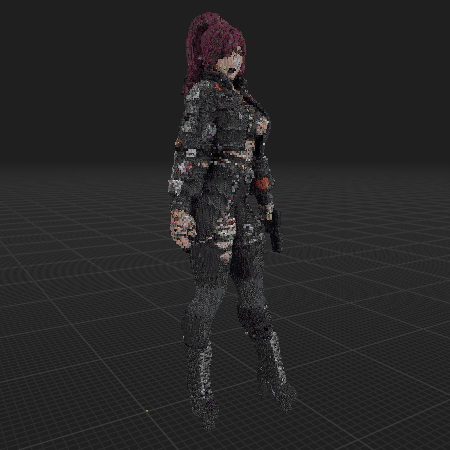
Action Female Character Model. Ultra Detailed. Maded With OBJToSchematic. Axiom Recommended #roleplay #decoration #cute #statue

The model contains
mud: 4179
cracked deepslate tiles: 2210
cracked deepslate bricks: 2983
deepslate tiles: 1249
deepslate bricks: 1572
gray wool: 155
chiseled deepslate: 699
polished blackstone bricks: 1532
observer: 83
deepslate coal ore: 664
cracked polished blackstone bricks: 894
netherite block: 606
blackstone: 2153
gray concrete: 279
polished deepslate: 672
deepslate: 827
cracked stone bricks: 179
deepslate copper ore: 217
cobbled deepslate: 940
stone: 79
coal ore: 220
gray concrete powder: 412
blast furnace: 70
chiseled stone bricks: 44
polished basalt: 170
smooth stone: 258
diorite: 183
dead brain coral block: 48
deepslate iron ore: 160
tuff: 53
light gray concrete powder: 278
mossy stone bricks: 4
gravel: 38
stone bricks: 71
andesite: 112
light gray wool: 166
lodestone: 17
black concrete powder: 2122
polished andesite: 84
clay: 137
sticky piston: 22
black wool: 1181
cobblestone: 62
coal block: 1038
cyan terracotta: 181
smoker: 28
reinforced deepslate: 14
dead horn coral block: 9
dropper: 36
gray glazed terracotta: 21
purple terracotta: 1417
black concrete: 680
crimson planks: 2177
lime wool: 472
polished diorite: 189
furnace: 3
basalt: 42
redstone ore: 120
acacia wood: 72
polished blackstone: 213
white wool: 8
deepslate redstone ore: 404
smooth basalt: 101
mycelium: 17
iron ore: 70
dead fire coral block: 23
white terracotta: 331
cherry planks: 63
muddy mangrove roots: 64
white concrete: 79
gilded blackstone: 122
dead tube coral block: 5
deepslate gold ore: 17
light gray terracotta: 92
birch wood: 45
soul soil: 168
soul sand: 74
black terracotta: 48
cherry log: 17
acacia log: 24
cracked nether bricks: 366
warped nylium: 192
chiseled nether bricks: 333
waxed exposed copper: 24
brown terracotta: 10
ancient debris: 104
raw iron block: 76
stripped cherry log: 11
brown glazed terracotta: 31
waxed exposed cut copper: 22
stripped dark oak log: 2
black glazed terracotta: 53
bone block: 14
gray terracotta: 13
fletching table: 8
dripstone block: 22
coarse dirt: 3
chiseled quartz block: 3
netherrack: 21
pink terracotta: 14
stripped mangrove log: 5
waxed cut copper: 25
iron block: 12
red glazed terracotta: 6
smithing table: 6
nether quartz ore: 24
red terracotta: 5
stripped dark oak wood: 1
note block: 5
purpur pillar: 4
cherry wood: 801
stripped crimson stem: 148
stripped mangrove wood: 5
magenta terracotta: 188
light blue terracotta: 6
blue terracotta: 44
stripped crimson hyphae: 240
deepslate lapis ore: 5
light gray concrete: 1
obsidian: 25
calcite: 2
stripped cherry wood: 20
warped stem: 1
purpur block: 8
diamond ore: 1
white concrete powder: 1
smooth sandstone: 3
light gray glazed terracotta: 3
nether bricks: 215
crimson hyphae: 5
dirt: 4
red concrete powder: 1
deepslate diamond ore: 1
warped hyphae: 2
mud bricks: 5
crimson stem: 5
mangrove planks: 3
bricks: 6
magenta concrete: 21
snow block: 1
waxed copper block: 1
magenta wool: 9
mangrove log: 1
pearlescent froglight: 1
gold ore: 1
polished granite: 3
jukebox: 1
granite: 2
purple glazed terracotta: 1
birch planks: 2
budding amethyst: 1
target: 1
oak planks: 1
How do I move or rotate the model?

Use the editor window above to rotate or move the model as you want, and then click the Get the command button to get a new command.
If you want to make more changes or completely remake the model, open the full version of the editor using the Open in BDEngine button.

How to use it?

Via command blocks:

To use a command in the game, you need a Command Block, as the chat field in Minecraft has a character limit.

      1. Open the chat on the "/" button and paste this command into it:
/give @p command_block
      2. Place the Command Block in the desired location.
      3. Right-click on the Command Block and specify in the Console Command field - this model's command, which you can copy by clicking on Get the command.
      4. Change Need Redstone to Always Active.
      5. Press Done.

Now you can destroy the Command Block and enjoy the installed model. Repeat the procedure several times if there are multiple model commands in the export window.

Via Axiom mod:

Be sure to install Axiom [modrinth] if you haven't already.

      1. Click Get the command, select Command format: Axiom and copy the command.
      2. Open the desired world in the game.
      3. Use ctrl + V to insert a model into the world.
      4. Click on the small white cube, next to the model, to move and rotate it.

Want to leave a comment?
Sign in or register - it only takes a minute.

Try my resource packs

Sign up to create and share content. Sign up
Dashboard
Chats
Sign In
Browse